In short
Timestral is open source, runs without a graphics card and can be tried for free on Google Colab with two code cells. The smallest version is 21 MB. The guide an AI assistant gave me contained four code errors and one inaccuracy about the licence: below you will find the code that actually works, possible uses for small businesses and schools, and the limits to keep in mind.
What Timestral is
Timestral is a family of time-series foundation models: it was trained on a huge number of numeric sequences and can continue a new one without being retrained on your data. This is called zero-shot forecasting. From the official repository:
- Four sizes: 5M (21 MB), 28M (111 MB), 123M (490 MB) and 209M parameters (837 MB).
- Runs on a CPU: no graphics card needed.
- Probabilistic forecasts: 21 quantiles per step, so you get not only the most likely value but also a range ("8 times out of 10 it will be between here and here").
- Long history: up to 32,768 points, plus external variables known in advance (public holidays, for example).
Mistral says the largest version ranks first on the three main benchmarks in the field (GIFT-Eval, TIME and fev-bench). These are the company's own results: I would wait for independent checks before treating them as final.
How to try it for free on Google Colab
Google Colab is a Python notebook that runs in the browser, free with a Google account. For the small Timestral models you do not even need to turn on the GPU. Two cells are enough.
Cell 1, installation:
!pip install git+https://github.com/mistralai/timestral.gitCell 2, the forecast and the chart. This is the code that finally worked:
import numpy as np
import matplotlib.pyplot as plt
from timestral import TimestralForecaster

forecaster = TimestralForecaster.from_pretrained("mistralai/Timestral-5M")

# 100 test values: put your own data here (visits, sales, energy use...)
context = np.random.default_rng(42).standard_normal(100).cumsum()

h = 24  # how many steps to forecast
forecast = forecaster.forecast(context, prediction_length=h)
median = np.squeeze(forecast.median)  # from (1, 1, 24) to (24,)

x = range(len(context), len(context) + h)
plt.plot(context, label="History")
plt.plot(x, median, "--", label="Timestral forecast")
plt.legend()
plt.show()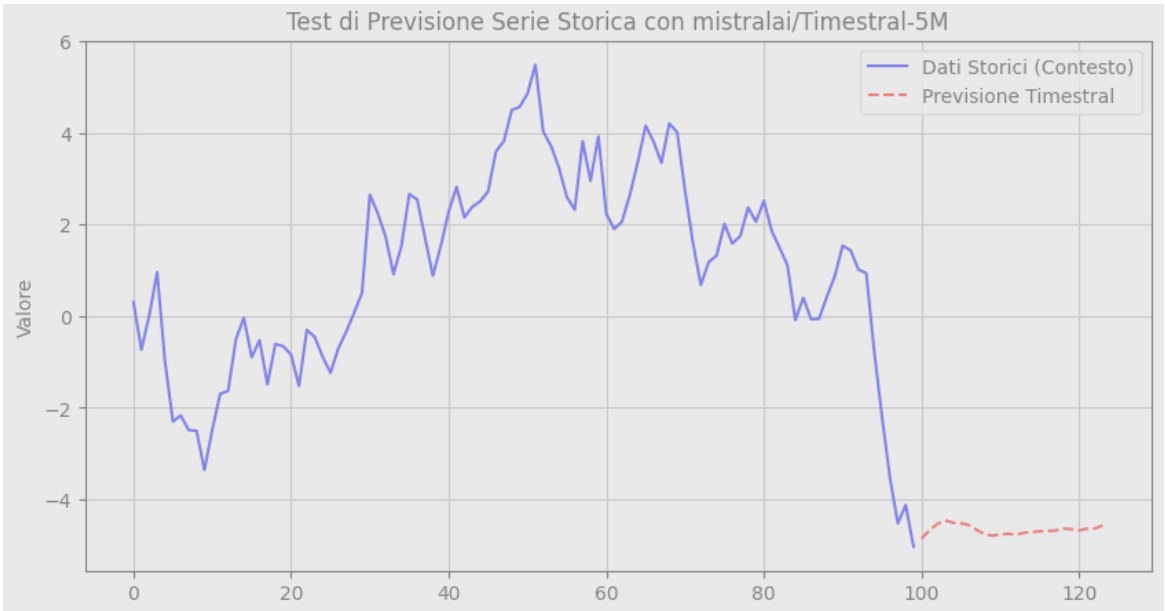
If you also want the uncertainty range, add these lines before plt.legend() (from the official documentation):
low = np.squeeze(forecast.quantile(0.1))
high = np.squeeze(forecast.quantile(0.9))
plt.fill_between(x, low, high, alpha=0.3, label="8 cases out of 10")
To use real data, upload a CSV to Colab and replace the context line with something like pd.read_csv("visits.csv")["visits"].to_numpy().
The AI guide's four mistakes
For this test I let an AI assistant guide me, as anyone would with a brand-new model. The explanations were clear and confident. The code was not:
- A class that does not exist. The first script imported
Timestral: error. The right class isTimestralForecaster. - An install that confused Python. Even with the right name the import failed: I had installed the package inside the cloned folder and Python found that folder instead of the package. Fix: restart the session and install straight from GitHub, as in cell 1.
- An invented method. The script called
.to(device), typical of PyTorch models, but this object does not have it. For the GPU you passdevice="cuda"tofrom_pretrained. - The wrong shape. The forecast comes out as (series, variates, steps), i.e. (1, 1, 24), and the chart broke. You need
np.squeeze.
There was also a more serious inaccuracy, because it raises no error: the guide said the weights can be used "freely, including for commercial purposes". The licence actually excludes companies with more than 20 million dollars in monthly revenue. For a school or a small business nothing changes; for a large group it does.
Every error was fixed in seconds, but only because I read the message and reported it back. AI prepares, a person checks.
It is the same pattern I saw when I had AI grade the same essay 50 times: the tone is always confident, even when the answer is wrong. With a model released two weeks earlier, the assistant could not know its code and rebuilt plausible names. The official README had the right answer from the start.
What it is really useful for
Time-series forecasting helps wherever numbers are collected over time and something has to be decided in advance:
- Small businesses and shops: weekly sales to order stock, quote requests to plan staff.
- Websites and social media: visits and views, to tell whether a drop is normal or a warning sign.
- Energy: solar production and consumption, to shift loads to the right hours.
- Schools and training: course enrolments, platform logins, office workload at peak times.
The advantage over classic methods is that you do not have to build and tune a model for each series. And since it runs on a CPU, your data can stay on your own computer, like the other local AI tools I use.
Limits to keep in mind
- It forecasts, it does not explain. It tells you visits will drop, not why.
- It does not know the future you know. A promotion, a holiday, a closure: unless you pass them as variables, the model cannot see them.
- Check it on your own data. The simplest method: hide the last few weeks, have it forecast them and compare with what really happened. If it is far off, do not trust its forecast of the weeks ahead.
In short
Timestral is a serious tool, free for anyone who is not a multinational, and you can try it in ten minutes without installing anything on your computer. The most useful lesson, though, is not about Timestral: with newly released tools, the official documentation beats the AI assistant. Use AI to get explanations, but check the code against the README.
Frequently asked questions
Is Timestral free? The code is open source (Apache 2.0) and the model weights can be downloaded for free from Hugging Face under a modified MIT licence. Commercial use is allowed, but not if your company (or employer) has more than 20 million dollars in monthly revenue: in that case you need a commercial licence from Mistral. For schools, freelancers and small businesses it is effectively free.
Do I need a graphics card to use Timestral? No. Timestral is designed to run on a CPU. I tried it on the free tier of Google Colab without a GPU, using the 5-million-parameter version (21 MB), and the forecast arrived in a few seconds.
What can a small business or a school use Timestral for? To estimate how a series of numbers collected over time will continue: website visits, weekly sales, quote requests, energy use, course enrolments. It gives a central forecast and an uncertainty range. It does not explain causes, and it does not know about future events (holidays, promotions) unless you pass them in.